Introduction
APEX™ is EDAX’s premier software for collecting and analyzing Energy Dispersive Spectroscopy (EDS) and Electron Backscatter Diffraction (EBSD) data. Here, we will discuss the Full Standards Quant (FSQ) and other new functionalities available in APEX 2.2.
Spectrum and Image Annotation
With the recent addition of the floating Annotation Toolbar, you can easily add text and shapes to images and spectra. An optional ruler can measure any feature then save the measurement with the image. You can save all annotations to an HDF5 file and the associated report, then edit or delete the annotations after creation. Furthermore, spectra can be saved as images with annotations.
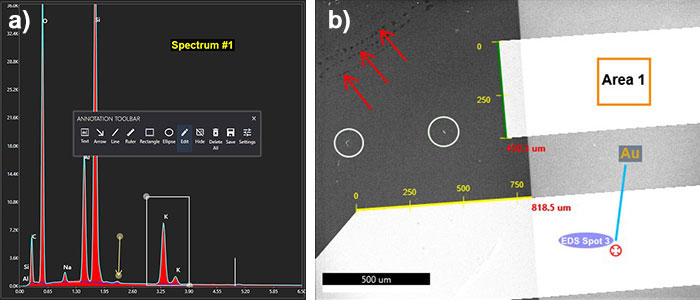
Figure 1. a) Floating toolbar and annotations in the spectrum. b) Annotations in the SEM image.
Spectrum Normalization
By default, multiple spectra were previously normalized to the highest energy peak. The latest Spectrum Normalization capability gives you the flexibility to normalize spectra based on any peak by selecting the region, element, or drawing in the spectrum overlay. The ratio information shows on the overlay, then displays the normalized energy range in the report.
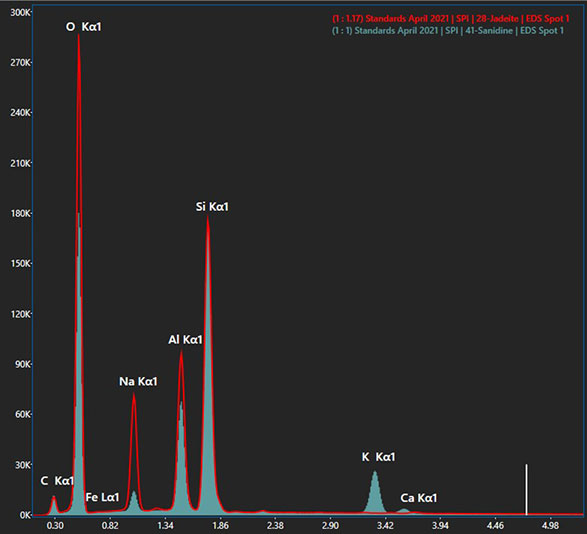
Figure 2. Spectra normalized to the Si Kα peak. The ratio information is shown in the top-right corner.
Quant Montage Maps
In APEX 2.0, Montage mapping allows precise large-area imaging and EDS and EBSD mapping. It uses stage movements to collect individual high-resolution images and maps through a grid pattern over a large sample surface and stitches them into montages. In APEX 2.2, this capability moves one more step forward by allowing you to rebuild Montage maps as NET and ZAF (Wt% and At%) maps. The workflow is the same as rebuilding single-field EDS maps for ease of use.
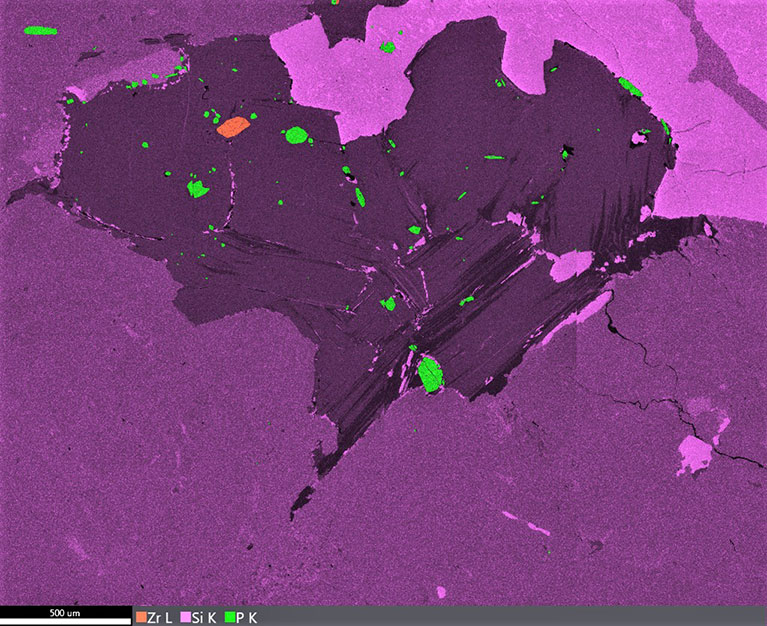
Figure 3. Overlay of Wt% Montage Zr L, Si K, and P K maps consisting of 4 x 4 fields. The Zr L and P K peak overlap is resolved in the map.
Full Standards Quant
Full Standards Quant (FSQ) is the most important EDS feature in this release. It calculates a unique reference value from a single element standard spectrum to determine the product of the beam current and detector solid angle. The reference value is utilized with every subsequent spectrum collected at the given parameters. It normalizes out any differences in beam current and detector geometry. As long as the standard and unknown spectra were collected at the same accelerating voltage, the standard can be applied to quantify the unknown sample. There are three modes available in FSQ. The Standard mode is suitable for users who want to take complete control of the standard selection. The MultiStandards mode uses the mean values of the loaded standards. Finally, the SmartStandards mode is an intelligent approach that automatically picks the best fitting standards using an iterative internal assessment algorithm. The FSQ chart (Figure 4) gives a visual representation of how close your standards are to your unknown. It also generates a curve to show the calculated element concentration versus net counts based on the loaded standards.

Figure 4. FSQ chart of Si K. The yellow diamonds show standards, and the “X” indicates the unknown sample. The calculated curve gives the element concentration versus net counts based on the loaded standards.
Conclusion
The new APEX 2.2 features make the platform better and more powerful. As always, upgrading to APEX 2.2 from a previous version of APEX is free. We recommend that you take advantage of these powerful features to elevate your materials analysis.